
SL-Message1.05.0003 - Download
You'll be able to download in few seconds.
Publisher Description
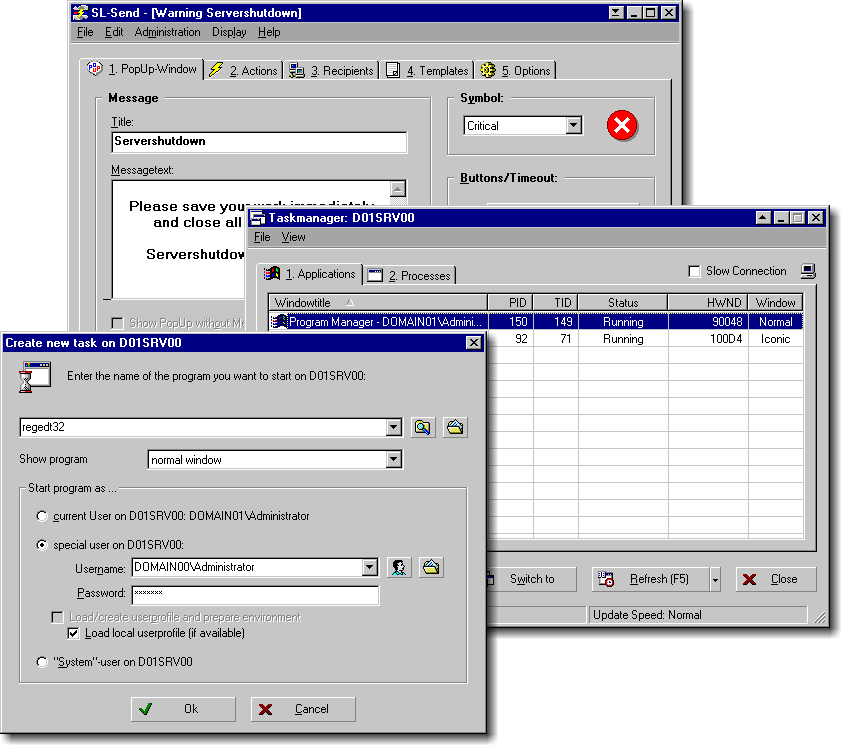
Instant network-messaging for your NT-domains or workgroups (great replacement to inpopup). Includes a remote-taskmanager, remote-shutdown and a really powerful scripting language which enables you to perform various actions on remote-computers. You can start programs, documents and url´s on multiple computers over your network. You can change the registry and ini-files, handle all fileoperations, create program-manager icons and shell-links, query user- and workstation-information and use these information for very flexible message filtering. As a highlight, all these actions may be executed under every usercontext you want (like UNIX su). Is has a multilingual user userinterface which can be restricted for some users. It needs no separate server and routes broadcasts to other network-segments without changing your router configuration. The receive component of SL-Message runs as a real NT-service, messages are received and routed even if there is no user logged on. Now with network timeservice and compatibility with winpopup messages. Now with shell-extensions, plugin-support, and vbs-scripting
About SL-Message
This program is available in English, German. It was last updated on 29 September, 2026. SL-Message is compatible with the following operating systems: Windows.
The company that develops SL-Message is seliSoft Softwareentwicklung. The latest version released by its developer is 1.05.0003.
The download we have available for SL-Message has a file size of 3.1 MB. Just click the green Download button above to start the downloading process. The program is listed on our website since 2001-11-18 and was downloaded 0 times. We have already checked if the download link is safe, however for your own protection we recommend that you scan the downloaded software with your antivirus. Your antivirus may detect the SL-Message as malware if the download link is broken.
How to install SL-Message on your Windows device:
- Click on the Download button on our website. This will start the download from the website of the developer.
- Once the SL-Message is downloaded click on it to start the setup process (assuming you are on a desktop computer).
- When the installation is finished you should be able to see and run the program.
Program Details
System requirements
Download information
Pricing
Version History
version 1.05.0003
posted on 2001-11-18
Windows Shell-Extensions, PlugIn-Support, Internals Scripting, Increased Performance, Policies Support
Disclaimer
External Download
We do not host SL-Message on our servers. We did not scan it for viruses, adware, spyware or other type of malware. This app is hosted by the software publisher and passed their terms and conditions to be listed there. We recommend caution when installing it.
The external download link for SL-Message is provided to you by apps112.com without any warranties, representations or guarantees of any kind, so access it at your own risk.
If you have questions regarding this particular app contact the publisher directly. For questions about the functionalities of apps112.com contact us.
